Apple Mac mini M4 Review: The Tiny Desktop That Makes Every Dollar Work Overtime
If you’ve been waiting for the right moment to jump into the Mac ecosystem—or upgrade from an older Intel or M1/M2 Mac—the Apple Mac mini M4 is that moment.
For a starting price of $599 for the 10-core CPU / 10-core GPU M4 with 16GB unified memory and 256GB SSD, Apple has quietly built what might be the best price-to-performance desktop Mac you can buy right now.(Apple) And thanks to frequent deals dropping it to around $499, it’s edging into “no-brainer” territory.(WIRED)
This review from DigitalDealReviews.com breaks down why the Mac mini M4 isn’t just a good buy—it’s dangerously close to a must-buy for students, creators, home offices, and anyone who wants a small, powerful, quiet desktop that doesn’t torch their bank account.
Design & Ports: 5×5 Inches of Serious Power
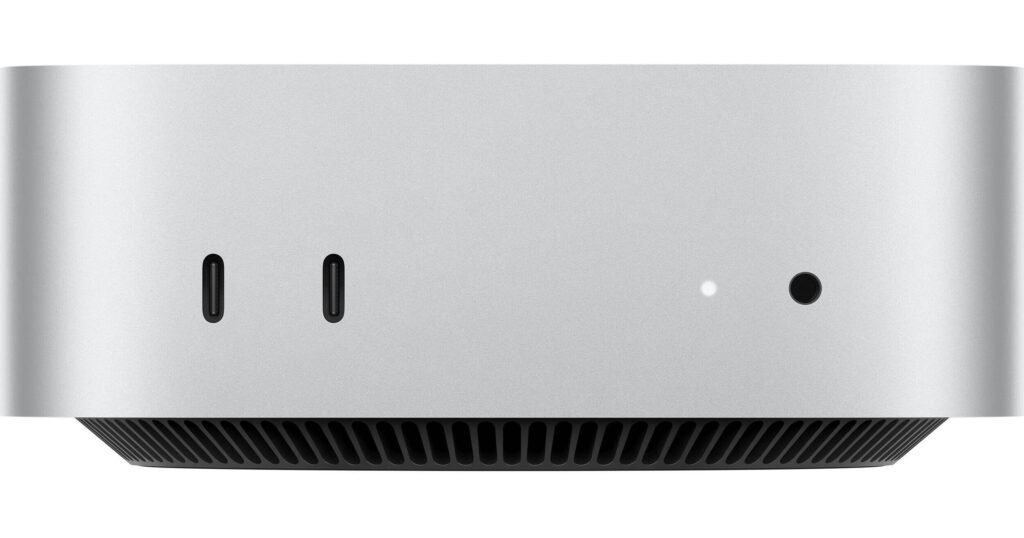
Apple shrunk the Mac mini into a 5 x 5 inch square—roughly Apple TV sized—but packed in more power than many full-tower PCs.(Wikipedia) It’s light, clean, and disappears under (or behind) almost any monitor setup.
Front:
- 2 × USB-C
- 3.5mm headphone jack
Back:
- 3 × Thunderbolt 4 (Thunderbolt 5 on M4 Pro models)(Wikipedia)
- HDMI
- Gigabit Ethernet (10GbE optional)(Apple)
You can now run up to three external displays from the base model—something that previously required stepping up to a “Pro” chip. For traders, coders, editors, and multitaskers, that’s huge.
Minor annoyances:
- No USB-A ports (you’ll likely want a hub).(Tom’s Guide)
- Power button placement and I/O positioning are a bit awkward on some desk setups.(9to5Mac)
But overall, it’s tiny, clean, and very living-room-friendly.
Specs & Performance: Why the M4 Chip Changes the Value Game
Under the hood, the base Mac mini ships with:
- Apple M4 chip (10-core CPU, 10-core GPU, 16-core Neural Engine)(Apple)
- 16GB unified memory (standard, not an extra-cost upgrade anymore)(Wikipedia)
- 256GB SSD (upgradeable at purchase, and even modular internally)(Wikipedia)
Apple claims up to 1.5× the CPU performance of M2 and up to 4× GPU performance depending on workload, and independent benchmarks show M4 competing in single-core performance with high-end desktop chips like Intel’s Core i9 and AMD Ryzen 7 series.(Wikipedia)
Real-world testing from reviewers backs this up:
- Described as “probably Apple’s best Mac mini ever”, delivering the fastest performance Apple has ever offered at this price point.(Ars Technica)
- TechRadar calls it “incredible value for money”, with a more compact design and excellent performance.(IT Pro)
- Hands-on tests show the base M4 Mac mini handling 4K video editing, 3D rendering, AI model inference, and heavy multitasking on a $600 machine.(Lon Seidman & Lon.TV Blog)
In other words: this thing punches way above its weight.
Price-to-Performance: Why This Is the Sweet Spot
Let’s zoom in on the key metric for DigitalDealReviews.com readers: value.
1. Base Price vs What You Get
At $599 retail (often $499 on sale), you’re getting:(Apple)
- A desktop chip that rivals or beats many high-end Intel/AMD CPUs in single-core tasks
- 16GB RAM standard (most PCs at this price still ship with 8GB)
- A machine capable of pro-level video editing, serious productivity, and light 3D work
When you compare that to prebuilt Windows desktops in the same price range—often saddled with weaker CPUs, spinning hard drives, and clunky cases—the Mac mini M4 looks aggressively priced.
2. Performance vs Other Macs
- It’s faster than previous M1/M2 minis and holds its own against some higher-priced Macs in real-world workloads.(Wikipedia)
- For most users, the jump to M4 Pro is only necessary if you’re a heavy 3D, color-grading, or software development power-user who lives in Xcode/Unreal/Resolve all day.(AppleInsider)
For everyday consumers, content creators, students, and home offices, the base M4 offers way more power than most will fully tap.
3. Discounts Push It Into “Must Buy” Territory
Recent deals dropping the 256GB model to $499 and the 512GB to around $689 make the Mac mini M4 one of the best cost-per-performance buys in the entire Apple lineup right now.(WIRED)
That’s laptop-level silicon in a desktop that costs less than many mid-range phones.
Real-World Use Cases: Who Is the Mac mini M4 Perfect For?
Creators & YouTubers
- 4K video editing in Final Cut or Premiere? Check.
- RAW photo editing in Lightroom and Photoshop? Smooth, as long as you aren’t batch-processing thousands of huge files at once.(Medium)
- Podcasting, music production, graphic design? Zero drama.
For solo creators or small studios, it’s a legit production machine—especially if you step up to 512GB SSD.
Remote Work & Home Office
- Handles video calls, huge spreadsheets, browser tab chaos, and productivity apps without breaking a sweat.(IT Pro)
- Supports up to three external monitors, so you can build a serious multi-display setup on a small desk footprint.(IT Pro)
Pair it with a good 27–32″ monitor and a mechanical keyboard, and you’ve got a clean, quiet workstation that sips power.
Students & First-Time Mac Buyers
For students, devs, and anyone switching from Windows, the Mac mini M4 is a near-perfect on-ramp:
- It’s cheaper than most MacBooks.
- You can reuse any monitor/keyboard/mouse you already own.
- It’s small enough for dorms and shared spaces.
Fast Company specifically calls out the M4 Mac mini as a fantastic machine for people new to Apple’s AI-powered features and Apple Intelligence workflows.
Light AI & Dev Work
Running local LLMs, coding, Docker containers, and dev environments? The M4’s CPU + Neural Engine combo and unified memory make it a surprisingly capable little AI and dev sandbox—especially considering the price.(Wikipedia)
Where Apple Still Overcharges (And How to Dodge It)
To keep this honest: the Mac mini M4 is a killer deal at base price, but Apple’s upgrade pricing is still… Apple.
- RAM & SSD upgrades are expensive compared to DIY or PC options.(9to5Mac)
- However, unlike most Macs, the SSD is modular, and third-party storage modules are emerging at much lower prices than Apple’s own upgrades.(Wikipedia)
Practical tips:
- If you can, buy the 512GB model from a retailer when it’s on sale. That’s the real sweet spot for most users.(AppleInsider)
- Add external or hub-based SSD storage later (for example, an NVMe drive in a Mac mini stand/hub) to dodge Apple’s upgrade tax.(The Verge)
The Downsides (So You’re Not Surprised)
No machine is perfect, so here are the main trade-offs:
- No USB-A ports out of the box
- Easily fixed with a hub, but still mildly annoying.(Tom’s Guide)
- Accessories sold separately
- You’ll need to bring or buy your own keyboard, mouse, and monitor.(IT Pro)
- Gaming is still not its strong suit
- Apple Arcade and some native/ported titles are fine, but if you’re into AAA Windows gaming, this is not your main rig.(TechRadar)
If you understand those limits going in, you’re unlikely to be disappointed.
DigitalDealReviews Verdict: Why the Mac mini M4 Is a Must-Buy in 2025
When you stack everything up—price, performance, efficiency, and longevity—the Mac mini M4 is one of those rare tech products that feels slightly underpriced for what it delivers.
- Tiny footprint, huge performance
- 16GB RAM standard
- Often available around $499–$599
- Handles creator workflows, productivity, and light AI with ease
- Future-proof enough for years of use
Reviewers are calling it an “affordable powerhouse,” “incredible value,” and “possibly the best deal in computing right now.”(IT Pro) After comparing specs, pricing, and real-world testing, we agree.
DigitalDealReviews.com Rating: 9.5 / 10 – Must Buy
If you:
- Want a serious desktop without paying MacBook Pro money
- Are building or upgrading a home office or creator setup
- Or just want a fast, quiet, long-lasting Mac that won’t dominate your desk or your credit card
…the Apple Mac mini M4 should be at the absolute top of your shortlist.
If you’d like, I can also:
- Draft a SEO title & meta description tailored for digitaldealreviews.com
- Add a short “Pros vs Cons” comparison table and “Best Config to Buy” box you can drop directly into WordPress.